Pas de serveur. Juste une page. No server. Just a page.
PHP dans le in the Compiler l'interpréteur PHP en WebAssembly, et s'en servir pour de vrai. Compiling the PHP interpreter to WebAssembly, and using it for real.
Grégoire Pineau · @lyrixx · JoliCode
🐘
WA
PHP démarre… PHP is starting…
L English version version française
Bonjour ! 30 minutes pour comprendre comment on fait tourner PHP dans un navigateur.
Le badge en bas à droite : ce deck exécute VRAIMENT PHP, en ce moment, dans cette page.
On s'en servira plusieurs fois pendant le talk.
Hello! 30 minutes to understand how PHP runs in a browser.
The badge at the bottom right: this deck REALLY runs PHP, right now, in this page.
We will use it several times during the talk.
Où tourne PHP ? Where does PHP run?
mon-site.fr my-site.com
📄
WA JS php-web.mjs
GET /page.php →
← <html>…
✕
🐘
Le navigateur demande. Le serveur exécute PHP, et renvoie du HTML. The browser asks. The server runs PHP, and sends back HTML.
Et si PHP tournait dans la page , sans serveur ? What if PHP ran in the page , with no server?
Deux fichiers statiques, servis comme une image. C'est tout. Two static files, served like an image. That's all.
Le modèle qu'on connaît tous : requête HTTP, PHP s'exécute sur le serveur, renvoie du HTML.
[→] Et si on mettait l'éléphant directement dans le navigateur ?
[→] Concrètement : un .wasm et un .js, sur un hébergement statique.
The model we all know: an HTTP request, PHP runs on the server, sends back HTML.
[→] What if we put the elephant right in the browser?
[→] In practice: a .wasm and a .js, on static hosting.
Ça tourne déjà It already runs
🐘
emoji-converter
jolicode.github.io/emoji-converter
La lib PHP de JoliCode, dans la page. The PHP lib of JoliCode, in the page.
🔍
composer-diff
lyrixx.github.io/composer-diff
Compare deux composer.lock. Compares two composer.lock.
✍️
JoliTypo
jolitypo.jolicode.com
Corrige la microtypographie d'un texte. Fixes the microtypography of a text.
📝
Symfony Demo
lyrixx.github.io/php-wasm-demo/symfony-demo
La démo officielle, telle quelle. The official demo, as it is.
💿
EasyAdmin
lyrixx.github.io/php-wasm-demo/easyadmin
Le back-office d'un faux disquaire. The back office of a fake record shop.
📘
php.net
php.net/manual · pas sur GitHub Pages not on GitHub Pages
Les exemples s'exécutent dans la page. The examples run in the page.
Les cinq premiers sur GitHub Pages : zéro serveur PHP The first five on GitHub Pages: zero PHP server
Ce n'est pas un jouet : ces pages tournent avec ce builder.
emoji-converter, composer-diff, JoliTypo : du code PHP existant, réutilisé tel quel.
Et des applications Symfony entières : la Symfony Demo officielle, avec son admin, Doctrine, SQLite et 30 langues, et un back-office EasyAdmin, avec son dashboard de ventes. On verra comment au chapitre 6.
La doc php.net : le builder d'origine, de Derick Rethans pour la PHP Foundation, fabrique ses .wasm. Elle n'est pas sur GitHub Pages, mais ses exemples tournent dans la page.
[→] Les cinq premiers sont hébergés sur GitHub Pages : du statique, aucun serveur PHP.
It is not a toy: these pages run with this builder.
emoji-converter, composer-diff, JoliTypo: existing PHP code, reused as is.
And whole Symfony applications: the official Symfony Demo, with its admin, Doctrine, SQLite and 30 languages, and an EasyAdmin back office, with its sales dashboard. We will see how in chapter 6.
The php.net docs: the original builder, by Derick Rethans for the PHP Foundation, makes its .wasm. They are not on GitHub Pages, but their examples run in the page.
[→] The first five are hosted on GitHub Pages: static files, no PHP server.
Pourquoi faire ça ? Why do that?
♻️
Réutiliser Reuse Une lib PHP qui marche : pas de réécriture en JS. A PHP lib that works: no rewrite in JS.
🔒
Rien ne sort Nothing leaves Les données restent dans le navigateur. The data stays in the browser.
💸
Gratuit Free Un hébergement statique. Rien à maintenir. Static hosting. Nothing to maintain.
🎓
Montrer Show Playgrounds, docs, démos interactives. Playgrounds, docs, interactive demos.
Quatre raisons. Réutiliser du code PHP existant sans le porter en JS.
La confidentialité : un composer.lock, un texte, rien ne part sur un serveur.
Le coût : GitHub Pages, gratuit, pas de serveur à patcher.
La pédagogie : la doc PHP qui exécute ses exemples.
Four reasons. Reuse existing PHP code without porting it to JS.
Privacy: a composer.lock, a text, nothing goes to a server.
Cost: GitHub Pages, free, no server to patch.
Teaching: the PHP docs that run their examples.
Le voyage The journey
De php-src à votre page From php-src to your page
01 WebAssembly le CPU qui n'existe pas the CPU that does not exist 02 PHP, du C PHP, in C et sa prise : la SAPI and its plug: the SAPI 03 Compiler Compile Emscripten, Docker 04 Brancher Connect JS ↔ PHP, octet par octet JS ↔ PHP, byte by byte 05 Livrer Ship embarquer, tester, déployer embed, test, deploy 06 Symfony pour de vrai, sans serveur for real, no server
🐘 L'éléphant en bas de l'écran vous dit où on en est. 🐘 The elephant at the bottom of the screen tells you where we are.
Le plan, en six stations. On part de zéro : qu'est-ce que WebAssembly ?
Puis PHP lui-même, sa compilation, comment JS lui parle, comment on livre tout ça. Et pour finir, un vrai Symfony.
The plan, in six stations. We start from scratch: what is WebAssembly?
Then PHP itself, its compilation, how JS talks to it, how we ship all that. And to finish, a real Symfony.
01
WebAssembly, WebAssembly, Le CPU qui n'existe pas The CPU that does not exist
Chapitre 1 : les bases. Pas besoin de connaître WASM pour suivre.
Chapter 1: the basics. No need to know WASM to follow.
Un CPU ne parle qu'une langue A CPU speaks one language
add.c
                int add(int a, int b)
                {
                    return a + b;
                }
gcc → x86-64
8d 04 37 c3lea eax, [rdi+rsi] · ret 💻 Intel, AMD
✓
gcc → ARM64
00 00 01 0b c0 03 5f d6add w0, w0, w1 · ret 📱 téléphone, Mac M phone, Apple M
✓
x86-64 sur ARM ? x86-64 on ARM? 8d 04 37 c3« connais pas » “never heard of it” 📱
✗
Un binaire par CPU. Et par OS. One binary per CPU. And per OS.
Le même code C, compilé pour x86 : 4 octets. Pour ARM : 8 octets, totalement différents.
Le binaire x86 ne veut rien dire pour un processeur ARM.
C'est pour ça qu'on télécharge « la version Mac M1 » ou « la version Linux x86 ».
The same C code, compiled for x86: 4 bytes. For ARM: 8 bytes, completely different.
The x86 binary means nothing to an ARM processor.
That is why we download "the Mac M1 version" or "the Linux x86 version".
WebAssembly : un CPU imaginaire WebAssembly: an imaginary CPU
add.c
                int add(int a, int b)
                {
                    return a + b;
                }
emcc →
WA
20 00 20 01 6a 0b
💻 x86-64 ✓
📱 ARM ✓
🍏 Apple M ✓
🖥️ node, serveur node, server ✓
Au chargement, le navigateur traduit le .wasm dans la langue de votre CPU. On load, the browser translates the .wasm into the language of your CPU.
standard W3C, 2019 W3C standard, 2019 tous les navigateurs depuis 2017 every browser since 2017 node, Deno, Bun, wasmtime…
WebAssembly, c'est un jeu d'instructions pour un processeur qui n'existe pas.
On compile UNE fois, pour ce CPU imaginaire.
[→] Et chaque machine traduit au chargement vers son vrai CPU : x86, ARM…
[→] C'est un standard du W3C, dans tous les navigateurs, et aussi hors navigateur.
WebAssembly is an instruction set for a processor that does not exist.
We compile ONCE, for this imaginary CPU.
[→] And each machine translates it on load to its real CPU: x86, ARM…
[→] It is a W3C standard, in every browser, and outside the browser too.
À quoi ça ressemble ? What does it look like?
add.c
int add(int a, int b)
{
return a + b ;
}
add.wat · le texte add.wat · the text
(module
(func (export "add" )
(param i32 i32 )
(result i32 )
local.get 0
local.get 1
i32.add
) )
add.wasm
…
20 00
20 01
6a
0b
Une instruction = un ou deux octets. Et pas de registres : une stack. One instruction = one or two bytes. And no registers : a stack.
Le même add. En texte, le format WAT : des instructions très simples.
[→] Et le binaire : chaque instruction fait un ou deux octets.
[→] Les couleurs : a = local.get 0 = 20 00, b = local.get 1 = 20 01, + = i32.add = 6a, fin = 0b.
Remarquez : pas de registres. Une stack machine. Voyons ce que ça veut dire.
The same add. As text, the WAT format: very simple instructions.
[→] And the binary: each instruction is one or two bytes.
[→] The colors: a = local.get 0 = 20 00, b = local.get 1 = 20 01, + = i32.add = 6a, end = 0b.
Notice: no registers. A stack machine. Let's see what that means.
Une stack machine A stack machine
add(2, 40)
local 0 = 2
local 1 = 40
local.get 0push local 0 pushes local 0 local.get 1push local 1 pushes local 1 i32.addpop deux valeurs, push leur somme pops two values, pushes their sum endrenvoie le sommet de la stack returns the top of the stack
2
40
42
la stack the stack → 42
On exécute add(2, 40) à la main.
[→] local.get 0 : on push 2.
[→] local.get 1 : on push 40.
[→] i32.add : on pop deux valeurs, on push 42.
[→] end : ce qui reste sur la stack, c'est le résultat. Simple, et facile à vérifier : c'est pour ça que c'est sûr.
Let's run add(2, 40) by hand.
[→] local.get 0: we push 2.
[→] local.get 1: we push 40.
[→] i32.add: we pop two values, we push 42.
[→] end: what is left on the stack is the result. Simple, and easy to check: that is why it is safe.
41 octets. En direct. 41 bytes. Live.
En haut : le fichier add.wasm en entier. 41 octets, écrits à la main dans ce deck.
Un header, puis des sections, qui commencent toutes pareil : leur numéro, puis leur taille. Ensuite, le contenu.
[→] Le header : "\0asm", le magic number qui dit « je suis du WebAssembly », puis la version 1.
[→] Section 1, les types, c'est-à-dire les signatures. 60 veut dire « fonction », 7f veut dire « i32 ». Le type 0, c'est (i32, i32) → i32.
[→] Section 3, les fonctions : il y en a une, de type 0. Juste sa signature : son code est plus loin.
[→] Section 7, les exports : ce que JavaScript voit. La fonction 0, sous le nom "add".
[→] Section 10, le code : on retrouve les 4 instructions de la stack machine.
[→] Et on l'exécute pour de vrai : le navigateur vient de le compiler en code machine. On peut changer les nombres. Essayer 2147483647 + 1 : des entiers 32 bits !
At the top: the whole add.wasm file. 41 bytes, written by hand in this deck.
A header, then sections, that all start the same way: their number, then their size. Then, the content.
[→] The header: "\0asm", the magic number that says "I am WebAssembly", then version 1.
[→] Section 1, the types, that is the signatures. 60 means "function", 7f means "i32". Type 0 is (i32, i32) → i32.
[→] Section 3, the functions: there is one, of type 0. Only its signature: its code comes later.
[→] Section 7, the exports: what JavaScript sees. Function 0, under the name "add".
[→] Section 10, the code: here are the 4 instructions of the stack machine.
[→] And we run it for real: the browser just compiled it to machine code. The numbers can be changed. Try 2147483647 + 1: 32-bit integers!
Une sandbox fermée A closed sandbox
module .wasm
⚙️ code
00 2a 00 00 53 61 6c 75 74 00
la mémoire : un grand array d'octets the memory: a big array of bytes
i32 i64 f32 f64
que des nombres. Pas de string, pas d'objet. only numbers. No string, no object.
📁 fichiers files ✗
🖥️ écran screen ✗
🌐 réseau network ✗
add(2, 40)export : JS appelle le module : JS calls the module
une fonction que le module rend publique a function that the module makes public
print(42)import : le module appelle JS : the module calls JS
seulement les fonctions que JS lui a données only the functions that JS gave it
JavaScript · l'hôte JavaScript · the host 📁 fichiers files ✓
🖥️ écran screen ✓
🌐 réseau network ✓
Écrire, lire un fichier… PHP devra tout demander à JavaScript. Writing, reading a file… PHP will have to ask JavaScript for everything .
Le module est une boîte fermée : du code, et une mémoire qui n'est qu'un grand array d'octets.
[→] Il n'a accès à rien : ni fichiers, ni écran, ni réseau.
[→] Et il ne manipule que des nombres. Pas de strings ! Retenez ça, ça va compter.
[→] Qui a accès à tout ça ? JavaScript, le programme qui charge le module : on l'appelle l'hôte.
[→] Entre les deux, deux portes, pas plus. Les exports : les fonctions que le module rend publiques. JS les appelle : c'est notre add(2, 40) de tout à l'heure.
[→] Les imports : des fonctions que JS donne au module quand il le charge. Seulement celles-là : pas d'eval, pas de DOM, il ne peut pas lancer n'importe quel JS. Le module ne sait pas afficher 42 ? Il appelle print(42), et c'est JS qui affiche. PHP, lui, en reçoit 100.
[→] Donc quand PHP fera echo, ce sera un import : c'est JS qui fera le travail.
The module is a closed box: code, and a memory that is just a big array of bytes.
[→] It has access to nothing: no files, no screen, no network.
[→] And it only handles numbers. No strings! Remember that, it will matter.
[→] Who has access to all that? JavaScript, the program that loads the module: we call it the host.
[→] Between the two, two doors, no more. The exports: the functions that the module makes public. JS calls them: that is our add(2, 40) from before.
[→] The imports: functions that JS gives to the module when it loads it. Only those: no eval, no DOM, it cannot run any JS it wants. The module cannot display 42? It calls print(42), and JS displays it. PHP gets 100 of them.
[→] So when PHP does an echo, it will be an import: JS will do the work.
02
PHP ? PHP? Et sa prise vers le monde : la SAPI And its plug to the world: the SAPI
Chapitre 2 : ouvrons le capot de PHP.
Chapter 2: let's open the hood of PHP.
Anatomie de php-src Anatomy of php-src
SAPI
cli fpm apache2handler embed
main streams, php.ini, sortie, superglobales streams, php.ini, output, superglobals
Zend Engine compile le PHP en opcodes, et les exécute compiles PHP to opcodes, and runs them
extensions standard · json · pcre · mbstring · dom · intl…
libs C C libraries libxml2 · oniguruma · ICU · OpenSSL · SQLite
SAPI = Server API : la prise entre PHP et le monde. Qui lui donne la requête ? Où part l'echo ?SAPI = Server API : the plug of PHP to the world. Who gives it the request? Where does echo go?
PHP, c'est un gros programme C.
[→] Au cœur, le Zend Engine : il compile votre PHP en opcodes et les exécute.
[→] Autour, les extensions, qui s'appuient souvent sur des libs C : libxml2 pour dom, ICU pour intl…
[→] main : les streams, php.ini, la sortie.
[→] Et tout en haut, la SAPI. C'est la prise : cli pour le terminal, fpm pour nginx…
[→] Et une SAPI moins connue : embed.
PHP is a big C program.
[→] At its heart, the Zend Engine: it compiles your PHP to opcodes and runs them.
[→] Around it, the extensions, that often rely on C libraries: libxml2 for dom, ICU for intl…
[→] main: the streams, php.ini, the output.
[→] And at the very top, the SAPI. It is the plug: cli for the terminal, fpm for nginx…
[→] And a lesser known SAPI: embed.
La SAPI embed The embed SAPI
PHP, en lib PHP, as a library
mon-php.c my-php.c
                #include <sapi/embed/php_embed.h>
                int main(int argc, char **argv)
                {
                    php_embed_init(argc, argv);
                    zend_eval_string("echo 'Salut';", NULL, "code");
                    php_embed_shutdown();
                }
1 PHP démarre PHP starts 2 PHP exécute du code PHP runs code 3 PHP s'arrête PHP stops
                $ gcc mon-php.c -lphp -o mon-php
                $ ./mon-php
                Salut
                $ gcc my-php.c -lphp -o my-php
                $ ./my-php
                Salut
Du C… qu'on sait compiler en WebAssembly. 🤔 C… that we can compile to WebAssembly. 🤔
Avec la SAPI embed, PHP devient une lib, libphp, qu'on appelle depuis son propre programme C.
[→] On démarre PHP, [→] on lui donne du code, [→] on l'arrête.
[→] Trois fonctions, et on a notre propre « php ».
[→] Et ça, c'est du C. Et on vient de voir qu'on sait compiler du C en WebAssembly…
With the embed SAPI, PHP becomes a library, libphp, that we call from our own C program.
[→] We start PHP, [→] we give it code, [→] we stop it.
[→] Three functions, and we have our own "php".
[→] And that is C. And we just saw that we know how to compile C to WebAssembly…
03
Compiler PHP Compiling PHP Emscripten, et une chaîne de montage Docker Emscripten, and a Docker assembly line
Chapitre 3 : la compilation. C'est le cœur du projet : le Dockerfile.
Chapter 3: the compilation. The heart of the project: the Dockerfile.
Emscripten : un faux OS, en JSEmscripten : a fake OS, in JS
hello.c
                    #include <stdio.h>
                    int main(void)
                    {
                        printf("Salut\n");
                    }
                $ emcc hello.c -o hello.mjs
                $ node hello.mjs
                Salut
WA le code the code JS hello.mjsla glue the glue
Linux
Emscripten
ton code your code hello.c printf("Salut\n")
hello.c .wasm printf("Salut\n")
la libc the libc glibc write(1, …)
musl .wasm write(1, …)
le kernel the kernel Linux un syscall a system call
la glue JS the JS glue .mjs fd_write(1, …)
les fichiers the files sur le disque on the disk
en mémoire in memory .mjs un faux disque, en JS a fake disk, in JS
Sur Linux, printf ne sait pas écrire : la libc demande au kernel . On Linux, printf cannot write: the libc asks the kernel .
Emscripten compile ton code et une vraie libc en .wasm (clang + LLVM). Emscripten compiles your code and a real libc to .wasm (clang + LLVM).
Pas de kernel dans la sandbox : la libc appelle un import de la glue JS. No kernel in the sandbox: the libc calls an import of the JS glue.
fopen() marche aussi : la glue garde les fichiers en mémoire.fopen() works too: the glue keeps the files in memory.
L'outil, c'est Emscripten. emcc remplace gcc.
Il produit deux fichiers : le .wasm, le code compilé, et un .mjs, la glue JavaScript.
[→] Rappel : sur Linux, printf ne sait pas écrire à l'écran. Il passe par la libc, qui fait un syscall : c'est le kernel qui écrit. Pareil pour les fichiers : c'est le kernel qui parle au disque.
[→] Emscripten compile votre code, et une vraie libc, musl, en WebAssembly, avec clang et LLVM. Les deux finissent dans le .wasm.
[→] Mais dans la sandbox, il n'y a pas de kernel. Alors la libc appelle un import, fd_write, et c'est la glue JS qui fait le travail du kernel.
[→] Pareil pour les fichiers : fopen marche, la glue garde un faux disque en mémoire.
D'où le titre : un faux OS, écrit en JS.
The tool is Emscripten. emcc replaces gcc.
It makes two files: the .wasm, the compiled code, and a .mjs, the JavaScript glue.
[→] Reminder: on Linux, printf cannot write to the screen. It goes through the libc, that makes a system call: the kernel writes. Same for files: the kernel talks to the disk.
[→] Emscripten compiles your code, and a real libc, musl, to WebAssembly, with clang and LLVM. Both end up in the .wasm.
[→] But in the sandbox, there is no kernel. So the libc calls an import, fd_write, and the JS glue does the work of the kernel.
[→] Same for files: fopen works, the glue keeps a fake disk in memory.
Hence the title: a fake OS, written in JS.
Une extension, une lib One extension, one library
mbstring→ oniguruma dom xml simplexml→ libxml2 pdo_sqlite sqlite3→ SQLite openssl→ OpenSSL intl→ ICU gd→ libpng · libjpeg-turbo · libwebp zip zlib→ libzip · zlib sodium→ libsodium
php-web.wasm
libsodium
libzip · zlib
libpng · libjpeg-turbo · libwebp
ICU
OpenSSL
SQLite
libxml2
oniguruma
libphp.a
Compilées elles aussi avec emcc. Pas de .so, pas de dlopen() : tout dans un seul fichier. Compiled with emcc too. No .so, no dlopen(): all in one file.
Les extensions s'appuient sur des libs C. Il faut donc les compiler, elles aussi, en WebAssembly.
[→] mbstring a besoin d'oniguruma, [→] les extensions XML de libxml2, [→] SQLite, [→] OpenSSL, [→] et intl d'ICU.
[→] gd, de trois libs : une par format d'image, PNG, JPEG, WebP. [→] zip et zlib, de libzip et zlib : zlib sert aussi à libpng. [→] Et sodium, de libsodium.
[→] Et il n'y a pas de chargement dynamique : pas de .so. Tout est lié en statique, dans un seul .wasm.
Extensions rely on C libraries. So they must be compiled to WebAssembly too.
[→] mbstring needs oniguruma, [→] the XML extensions need libxml2, [→] SQLite, [→] OpenSSL, [→] and intl needs ICU.
[→] gd needs three libraries: one per image format, PNG, JPEG, WebP. [→] zip and zlib need libzip and zlib: zlib serves libpng too. [→] And sodium needs libsodium.
[→] And there is no dynamic loading: no .so. Everything is linked statically, into a single .wasm.
docker/Dockerfile
Une chaîne de montage An assembly line
EXTENSIONS="mbstring dom"
EXTENSIONS="mbstring dom intl "
resolve le plan the plan
php-src git clone
oniguruma
libxml2
icu
libiconv
openssl
sqlite
zlib
libpng
libjpeg
libwebp
libzip
libsodium
php configure + make
link emcc → .wasm
📦 php-web.mjs php-web.wasm
compile builds rien à faire nothing to do en cache cached
Chaque étape ne lit que son bout du plan : Docker ne refait que ce qui a changé. Each stage reads only its part of the plan: Docker only redoes what changed.
Le Dockerfile est découpé en étapes : une par lib, douze aujourd'hui, puis PHP, puis le link.
[→] Première étape, resolve : elle transforme la liste des extensions en un « plan », fait de petits fichiers. Avec mbstring et dom, on compile oniguruma et libxml2, les autres étapes ne font rien.
[→] Si j'ajoute intl : seule ICU se compile, puis PHP et le link. Le reste sort du cache Docker.
C'est pour ça que le plan est fait de petits fichiers : chaque étape ne dépend que du sien.
The Dockerfile is split into stages: one per library, twelve today, then PHP, then the link.
[→] First stage, resolve: it turns the list of extensions into a "plan", made of small files. With mbstring and dom, oniguruma and libxml2 are compiled, the other stages do nothing.
[→] If I add intl: only ICU compiles, then PHP and the link. The rest comes from the Docker cache.
That is why the plan is made of small files: each stage only depends on its own.
Combien ça pèse ? How big is it?
PHP 8.4 7,5 Mo 2,8 gzip 7.5 MB 2.8 gzip
PHP 8.5 8,7 Mo 3,0 gzip 8.7 MB 3.0 gzip
PHP 8.6 défaut default 8,7 Mo 3,1 gzip 8.7 MB 3.1 gzip
tout, sauf ICU all, but ICU 19,8 Mo 7,4 gzip 19.8 MB 7.4 gzip
Symfony 30,6 Mo 7,2 gzip 30.6 MB 7.2 gzip
+ intl, ICU 41,9 Mo 16,4 gzip 41.9 MB 16.4 gzip
32 Mo de données ICU, toutes les langues, en array C avec #embed (C23) :32 MB of ICU data, every language, as a C array with #embed (C23):
            alignas(16) const unsigned char icudt78_dat[] = {
            #embed "data/in/icudt78l.dat"
            };
Le prix à payer : la taille. 8,7 Mo pour PHP 8.6 avec les extensions par défaut, 3 Mo compressé. Une grosse image. Une application Symfony entière, avec son vendor : 7 Mo compressés.
intl est le plus lourd : ICU embarque les données de toutes les langues.
[→] L'astuce : ces 32 Mo de données sont transformés en array C avec #embed, une nouveauté de C23. Pas de fichier à télécharger à côté.
The price to pay: the size. 8.7 MB for PHP 8.6 with the default extensions, 3 MB compressed. A big image. A whole Symfony application, with its vendor: 7 MB compressed.
intl is the heaviest: ICU embeds the data of every language.
[→] The trick: these 32 MB of data become a C array with #embed, new in C23. No file to download next to it.
Ce qui ne marche pas (et pourquoi) What does not work (and why)
🔢 Entiers 32 bits 🔢 32-bit integers wasm32 : un long fait 4 octets.wasm32: a long is 4 bytes.
🧵 Fibers
WebAssembly ne sait pas suspendre puis reprendre une stack. WebAssembly cannot suspend a stack, then resume it.
Aborted(missing function: getcontext)
🚫 Processus 🚫 Processes Pas d'autre programme à lancer : exec(), proc_open()… No other program to run: exec(), proc_open()…
🌐 Réseau 🌐 Network Pas de socket : https:// et ssl:// ne se connectent pas. No socket: https:// and ssl:// do not connect.
Les limites, et elles s'expliquent toutes par ce qu'on a vu.
Les entiers : le module est en 32 bits, PHP_INT_MAX vaut 2 milliards. Ça, c'est exécuté en direct.
[→] Les Fibers : il faudrait suspendre et reprendre une stack, WebAssembly ne sait pas faire. Le module meurt.
[→] Les processus : il n'y a pas d'autre programme. On a même dû remplacer posix_spawn() par une version qui renvoie ENOSYS, sinon proc_open() tuait le module : c'est spawn.c.
[→] Et pas de réseau : rien ne sort de la sandbox.
The limits, and they are all explained by what we saw.
Integers: the module is 32-bit, PHP_INT_MAX is 2 billion. That one runs live.
[→] Fibers: a stack would have to be suspended and resumed, WebAssembly cannot do that. The module dies.
[→] Processes: there is no other program. We even had to replace posix_spawn() with a version that returns ENOSYS, otherwise proc_open() killed the module: that is spawn.c.
[→] And no network: nothing leaves the sandbox.
04
Parler à PHP Talking to PHP Octet par octet Byte by byte
Chapitre 4 : on a un .wasm. Comment on lui parle ? C'est le binding.
Chapter 4: we have a .wasm. How do we talk to it? That is the binding.
run.c : notre entrypoint : our entry point
docker/run.c, simplifié docker/run.c, simplified
                int run_code(char *code, int argc, char **argv)
                {
                    php_embed_init(argc, argv);
                    zend_eval_string(code, NULL, "Command line code");
                    int status = EG(exit_status);
                    php_embed_shutdown();
                    return status;
                }
                $ emcc run.o libphp.a … -o php-web.mjs \
                    -s EXPORTED_FUNCTIONS=_malloc,_free,_run_code,_run_file,…
🚀 démarre starts
⚙️ exécute runs
🧹 s'arrête stops
une requête one request
Rien ne survit d'un appel à l'autre. Comme PHP-FPM. Nothing survives from one call to the next. Like PHP-FPM.
Notre programme C à nous, c'est run.c. Une fonction run_code, une fonction run_file.
[→] PHP démarre, [→] exécute le code, [→] s'arrête et renvoie l'exit code.
Chaque appel est une requête complète : pas de variable qui traîne. Le modèle « shared nothing » de PHP.
[→] Et on dit à emcc d'exporter ces fonctions, plus malloc et free. Vous allez voir pourquoi.
Our own C program is run.c. A run_code function, a run_file function.
[→] PHP starts, [→] runs the code, [→] stops and returns the exit code.
Each call is a whole request: no variable lying around. The "shared nothing" model of PHP.
[→] And we tell emcc to export these functions, plus malloc and free. You will see why.
Une string ? Non : un pointeur . A string? No: a pointer .
            const bytes = new TextEncoder().encode(code + '\0');
            const ptr = _malloc(bytes.length);
            HEAPU8.set(bytes, ptr);
            _run_code(ptr, argc, argv);
            _free(ptr);
code = "echo 'Salut';"
un pointeur, c'est… un nombre : 1048 a pointer is… a number : 1048
côté C, char *code lit à partir de 1048… jusqu'au 00 on the C side, char *code reads from 1048… up to the 00
la place est rendue : PHP peut s'en resservir the space is given back: PHP can use it again
la mémoire du module, HEAPU8 · un octet par case the memory of the module, HEAPU8 · one byte per cell
Le problème : run_code veut un char*, et WebAssembly ne connaît que des nombres. On ne peut pas lui passer une string JS.
[→] On encode la string en UTF-8, avec un octet nul à la fin, comme le C l'attend.
[→] On réserve de la place dans la mémoire du module avec malloc. Il renvoie une adresse : juste un nombre.
[→] On copie les octets à cette adresse.
[→] On appelle run_code avec ce nombre : côté C, c'est un char*, il lit jusqu'au zéro.
[→] Et on libère. C'est ce que fait api.js, avec une précaution de plus : quand la mémoire est pleine, malloc() renvoie 0. Et en WebAssembly, 0 est une adresse valide : on y écrirait sans erreur.
The problem: run_code wants a char*, and WebAssembly only knows numbers. We cannot pass it a JS string.
[→] We encode the string in UTF-8, with a null byte at the end, as C expects.
[→] We reserve space in the memory of the module with malloc. It returns an address: just a number.
[→] We copy the bytes to this address.
[→] We call run_code with this number: on the C side, it is a char*, it reads up to the zero.
[→] And we free it. That is what api.js does, with one more precaution: when the memory is full, malloc() returns 0. And in WebAssembly, 0 is a valid address: writing there raises no error.
char **argv : des pointeurs de pointeurs : pointers to pointers php.runCode(code, { args: ['un', 'deux'] }) php.runCode(code, { args: ['one', 'two'] }) $argv
argv = 2000
1100 4c 04 00 00 1200 b0 04 00 00 1300 14 05 00 00
1100 "Standard input code\0"1200 "un\0" "one\0" 1300 "deux\0" "two\0"
        const pointers = argv.map(copyString);
        const array = _malloc(pointers.length * 4);
        HEAPU32.set(pointers, array / 4);
HEAPU8 et HEAPU32 : deux lunettes sur la même mémoire. Un u32 = 4 octets, à l'envers (little-endian).HEAPU8 and HEAPU32 : two lenses on the same memory. A u32 = 4 bytes, backwards (little-endian).
(Optionnelle : Shift+→ pour la sauter si on est en retard.)
Pareil pour les arguments, en pire : argv est un array de pointeurs.
[→] On copie chaque string : trois adresses.
[→] On réserve un array de 3 × 4 octets, [→] et on y écrit les trois adresses.
[→] HEAPU32 voit la même mémoire que HEAPU8, par paquets de 4 octets : d'où le array / 4. 1100, c'est 4c 04 00 00 en mémoire.
(Optional: Shift+→ to skip it when late.)
Same for the arguments, but worse: argv is an array of pointers.
[→] We copy each string: three addresses.
[→] We reserve an array of 3 × 4 bytes, [→] and we write the three addresses in it.
[→] HEAPU32 sees the same memory as HEAPU8, 4 bytes at a time: hence the array / 4. 1100 is 4c 04 00 00 in memory.
Et dans l'autre sens : echo And the other way: echo
PHP echo "Salut";
→
libc write(1, …)
→
glue JS JS glue Module.stdout(83)une fois par octet once per byte
→
JS [83, 97, 108, 117, 116]
S a l u t
            Module.stdin  = () => stdio.stdin[stdio.read++] ?? null;
            Module.stdout = (byte) => stdio.stdout.push(byte);
            Module.stderr = (byte) => stdio.stderr.push(byte);
TextDecoder "Salut"
stdin, à l'envers : PHP demande un octet, JS le donne. null : c'est fini.stdin, the other way around: PHP asks for a byte, JS gives it. null: it is over.
Quand PHP fait echo, ça descend jusqu'à la libc d'Emscripten, un write sur le descripteur 1.
[→] Et la glue JS appelle Module.stdout… une fois par octet !
[→] On les push dans un array.
[→] À la fin de l'exécution, TextDecoder transforme les octets en string UTF-8.
[→] stdin, c'est l'inverse : PHP demande l'octet suivant, null veut dire fin de fichier.
When PHP does an echo, it goes down to the libc of Emscripten, a write on file descriptor 1.
[→] And the JS glue calls Module.stdout… once per byte!
[→] We push them in an array.
[→] At the end of the run, TextDecoder turns the bytes into a UTF-8 string.
[→] stdin is the other way around: PHP asks for the next byte, null means end of file.
Et tout ça, pour trois lignes And all that, for three lines
                import createPhp from './php-web.mjs';

                const php = await createPhp();
                const result = await php.runCode(
                    'echo ucfirst(file_get_contents("php://stdin")), " ", $argv[1];',
                    { stdin: 'salut', args: ['🐘'] },
                );
                import createPhp from './php-web.mjs';

                const php = await createPhp();
                const result = await php.runCode(
                    'echo ucfirst(file_get_contents("php://stdin")), " ", $argv[1];',
                    { stdin: 'hello', args: ['🐘'] },
                );
runCode() est écrit en JS, et injecté dans le module : emcc --pre-js api.jsrunCode() is written in JS, and injected into the module: emcc --pre-js api.js
▶ Exécuter ▶ Run
{ … }
PHP démarre… PHP is starting…
Tout ce qu'on vient de voir est caché derrière une petite API : createPhp(), puis runCode() ou runFile().
On passe du code, des arguments, un stdin. On récupère l'exit code, stdout et stderr.
[Cliquer sur Exécuter] : c'est le vrai PHP qui tourne, dans un Web Worker de cette page.
All we just saw is hidden behind a small API: createPhp(), then runCode() or runFile().
We pass code, arguments, a stdin. We get back the exit code, stdout and stderr.
[Click on Run]: this is the real PHP running, in a Web Worker of this page.
05
Embarquer son code, Embedding your code, De votre projet à GitHub Pages From your project to GitHub Pages
Chapitre 5 : il reste à mettre NOTRE code dedans, et à le livrer.
Chapter 5: we still have to put OUR code in it, and to ship it.
PHP ne voit pas votre disque PHP does not see your disk
/
tmp/ en mémoire in memory app/ embarqué · dans le .wasm embedded · in the .wasm src/ · vendor/ etc/ssl/openssl.cnf embarqué embedded symfony/ IndexedDB
À l'exécution At runtime php.FS.writeFile('/tmp/in.json', data);
Au build : dans le .wasm At build time: in the .wasm
                    $ composer install --no-dev --classmap-authoritative
                    $ emcc … --embed-file ./build/embed@/app
Qui survit au rechargement That survives a reload const php = await createPhp({ persist: '/symfony' });
IndexedDB, et un verrou (Web Lock) entre les onglets. IndexedDB, and a lock (Web Lock) between the tabs.
PHP a son propre système de fichiers, celui d'Emscripten, en mémoire. Il ne voit pas votre disque.
[→] On peut y écrire depuis JS, à l'exécution.
[→] Ou embarquer un dossier au moment du build : votre code, avec son vendor sans les dépendances de dev, se retrouve DANS le .wasm.
[→] Et un dossier peut être sauvé dans IndexedDB : l'exemple Symfony garde sa base SQLite d'un rechargement à l'autre. Avec un verrou pour que deux onglets ne s'écrasent pas.
PHP has its own file system, the one of Emscripten, in memory. It does not see your disk.
[→] JS can write to it, at runtime.
[→] Or a folder can be embedded at build time: your code, with its vendor without the dev dependencies, ends up IN the .wasm.
[→] And a folder can be saved in IndexedDB: the Symfony example keeps its SQLite database from one reload to the next. With a lock, so that two tabs do not overwrite each other.
Une stack , une commande One stack , one command
stacks.php
                $php86 = Stack::named('php-8.6')
                    ->php('8.6.0')
                    ->extensions('ctype', 'dom', 'mbstring')
                    ->targets(Target::Web, Target::Node);

                return [$php86,
                    $php86->renamed('php-8.6-intl')
                        ->extensions('intl')];
                $ castor wasm:build php-8.6-intl
                $ castor wasm:run -r 'echo PHP_VERSION;'
                $ castor wasm:check
                $ castor wasm:serve symfony
Stack → bake.json → docker buildx bake
Toutes les stacks en un appel, en parallèle, qui partagent leurs layers. All the stacks in one call, in parallel, sharing their layers.
Une stack, c'est une version de PHP, des extensions, des targets : web et node. Et votre code à embarquer, si vous en avez.
[→] Immuable : on en dérive d'autres. Ici une stack intl.
[→] Castor les construit, les exécute, les vérifie, et sert les pages d'exemple.
[→] Castor ne sait pas compiler PHP : il écrit un fichier bake et lance docker buildx bake. Le Dockerfile reste la seule source de vérité.
A stack is a PHP version, extensions, targets: web and node. And your code to embed, if you have some.
[→] Immutable: other stacks are derived from it. Here an intl stack.
[→] Castor builds them, runs them, checks them, and serves the example pages.
[→] Castor does not know how to compile PHP: it writes a bake file and runs docker buildx bake. The Dockerfile stays the single source of truth.
Dans votre projet In your project
1
$ castor composer require lyrixx/php-wasm-builder
2
                function wasm_stack(): Stack
                {
                    return Stack::named('app')->extensions('ctype', 'mbstring')
                        ->embed('build/embed', at: '/app')
                        ->targets(Target::Web)->outputDir('public/build');
                }
                // castor wasm:build → build([wasm_stack()])
3
                import createPhp from './build/php-web.mjs';
                const { stdout } = await (await createPhp()).runFile('/app/src/page.php');
📖 lyrixx.github.io/php-wasm-builder/your-project
Dans votre projet, trois étapes.
Le package s'installe avec castor composer require : pas de dépendance dans votre composer.json.
[→] Vous déclarez votre stack : vos extensions, votre code embarqué dans /app, la target web.
[→] Et votre page importe le module et exécute votre fichier PHP.
[→] Le pas à pas est dans la doc, avec castor, ou avec Composer et Docker seulement.
In your project, three steps.
The package is installed with castor composer require: no dependency in your composer.json.
[→] You declare your stack: your extensions, your code embedded in /app, the web target.
[→] And your page imports the module and runs your PHP file.
[→] The step by step is in the docs, with castor, or with Composer and Docker only.
Tester, puis déployer Test, then deploy
Le build pour le web tourne aussi dans node : The build for the web runs in node too:
                $ node --import ./node/fetch-files.mjs \
                    --test tests/page.test.mjs
fetch() lit les URL file: sur le disque, comme un serveur les servirait.fetch() reads the file: URLs from the disk, as a server would serve them.
check_stack() la version, les extensions the version, the extensions run_code() du PHP, comme runCode() PHP code, like runCode() test_page() le JS de la page the JS of the page
📤 git push 🐳 castor wasm:build layers en cache GitHub Actions layers cached by GitHub Actions ✅ castor wasm:smoke ça démarre, ça répond ? does it start, does it answer? 🚀 GitHub Pages
Rien n'est déployé s'il ne répond pas. Nothing is deployed if it does not answer.
Pour tester, pas besoin de navigateur : le build web tourne dans node. fetch-files.mjs fait lire les fichiers au fetch() depuis le disque.
Trois fonctions castor : check_stack, run_code, test_page.
[→] En CI : un push, [→] un build avec le cache de GitHub Actions, donc seul ce qui change est recompilé, [→] un smoke test, [→] et le déploiement sur Pages.
[→] Si PHP ne répond pas, rien n'est déployé.
To test, no need for a browser: the web build runs in node. fetch-files.mjs makes fetch() read the files from the disk.
Three castor functions: check_stack, run_code, test_page.
[→] In CI: a push, [→] a build with the cache of GitHub Actions, so only what changes is compiled again, [→] a smoke test, [→] and the deployment to Pages.
[→] If PHP does not answer, nothing is deployed.
06
Un vrai Symfony, A real Symfony, Sept problèmes, sept astuces Seven problems, seven tricks
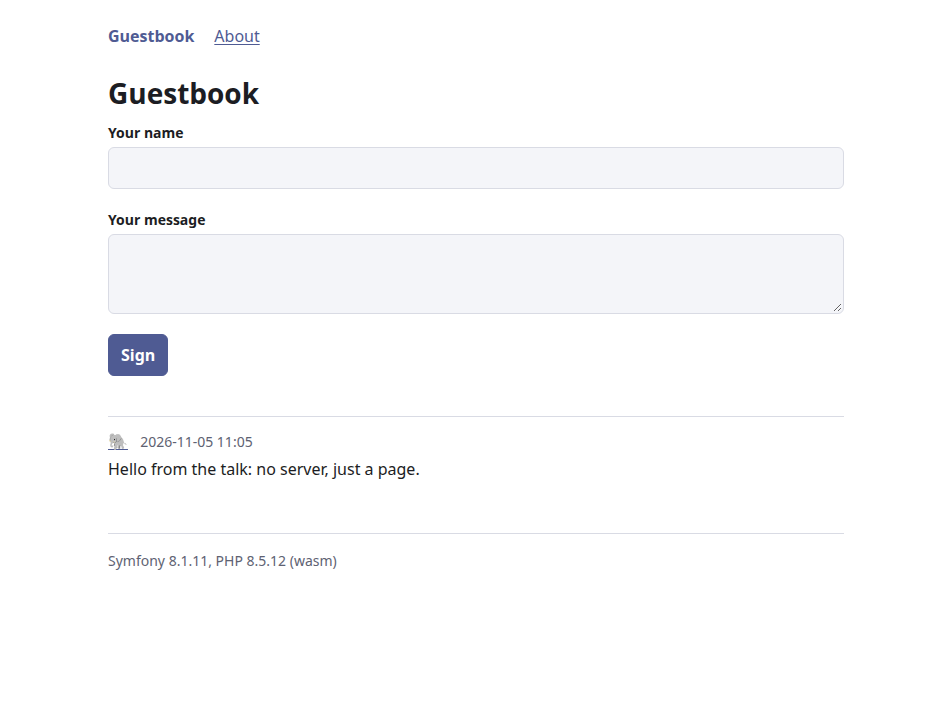
Chapitre 6 : pour de vrai. Un livre d'or en Symfony 8 : Doctrine, SQLite, Twig, des formulaires, du CSRF, une session. Une application normale, 3 932 fichiers PHP.
Sur GitHub Pages. Sept problèmes à résoudre.
Chapter 6: for real. A guestbook in Symfony 8: Doctrine, SQLite, Twig, forms, CSRF, a session. A normal application, 3,932 PHP files.
On GitHub Pages. Seven problems to solve.
Problème 1 / 7 Problem 1 / 7
Premier essai : ça explose First try: it blows up $ bin/console cache:warmup
RuntimeError: null function or function signature mismatch
la mémoire de PHP : ses objets, ses fonctions the memory of PHP: its objects, its functions
stack C · 64 Ko C stack · 64 KB stack C · 1 Mo C stack · 1 MB
PHP se rappelle lui-même, en C : array_map(), usort()… Chaque callback remplit la stack. PHP calls itself back, in C: array_map(), usort()… Each callback fills the stack.
≈ 400 callbacks de profondeur : la stack déborde sur PHP. Sans un mot. ≈ 400 callbacks deep: the stack overflows onto PHP. Without a word.
$ emcc … -s STACK_SIZE=1mb -s STACK_OVERFLOW_CHECK=2
Désormais, un stack overflow tue le module, au lieu d'écraser PHP. From now on, an overflow kills the module, instead of crushing PHP.
Symfony compile son conteneur, et plante : des objets appellent une fonction nulle. Ça ne veut rien dire.
[→] L'explication : PHP se rappelle lui-même en C, à travers les callbacks d'array_map, d'usort… Et la stack C d'Emscripten fait 64 Ko par défaut.
[→] À 400 callbacks de profondeur, elle déborde sur la mémoire de PHP. Sans erreur. PHP continue, avec une mémoire écrasée.
[→] Le correctif tient en deux options : une stack de 1 Mo, et une vérification. Ça ne se voit pas dans les mesures. Un stack overflow tue le module proprement.
Symfony compiles its container, and crashes: objects call a null function. It makes no sense.
[→] The explanation: PHP calls itself back in C, through the callbacks of array_map, usort… And the C stack of Emscripten is 64 KB by default.
[→] 400 callbacks deep, it overflows onto the memory of PHP. No error. PHP goes on, with crushed memory.
[→] The fix is two options: a stack of 1 MB, and a check. It does not show in the measures. An overflow kills the module cleanly.
Problème 2 / 7 Problem 2 / 7
Symfony veut une requête Symfony wants a request
index.php
                    http_response_code(201);
                    setcookie('talk', 'php');
                    printf('%s, %s', PHP_SAPI, $_POST['message']);
                const response = await php.request({
                    method: 'POST',
                    url: 'https://mon-site.fr/messages',
                    headers: {
                        'Content-Type': 'application/x-www-form-urlencoded',
                    },
                    body: 'message=Salut',
                }, { documentRoot: '/app/public' });
                const response = await php.request({
                    method: 'POST',
                    url: 'https://my-site.com/messages',
                    headers: {
                        'Content-Type': 'application/x-www-form-urlencoded',
                    },
                    body: 'message=Hello',
                }, { documentRoot: '/app/public' });
▶ Exécuter ▶ Run { … }
in_array(PHP_SAPI,
embed y est : Symfony se croit en ligne de commande. Pendant une requête, on renomme la SAPI wasmembed is in it: Symfony believes it is on the command line. During a request, we rename the SAPI wasm
runCode exécute un script. Symfony veut une requête HTTP : $_POST, les cookies, les headers.
Alors run.c gagne une troisième fonction, run_request, et l'API php.request(). Il remplit les variables comme CGI : PHP fait le reste, $_GET, $_POST, $_FILES, même les uploads.
[→] Exécuté en direct : le status, les headers, le body. Un fichier .php s'exécute, un autre fichier est renvoyé tel quel, le reste passe par index.php : le front controller.
[→] L'astuce : Symfony compare PHP_SAPI à cette liste, à une vingtaine d'endroits. Notre SAPI, c'est embed : Symfony se croit en ligne de commande, ses erreurs sortent en texte, display_errors est activé. Alors pendant une requête, run.c renomme la SAPI en wasm. Ce nom n'est pas dans la liste, donc pour Symfony c'est du web. C'est le wasm qu'on vient de lire dans la réponse.
runCode runs a script. Symfony wants an HTTP request: $_POST, the cookies, the headers.
So run.c gets a third function, run_request, and the API php.request(). It fills the variables as CGI does: PHP does the rest, $_GET, $_POST, $_FILES, even the uploads.
[→] Run live: the status, the headers, the body. A .php file runs, any other file is sent as it is, the rest goes through index.php: the front controller.
[→] The trick: Symfony compares PHP_SAPI to this list, in about twenty places. Our SAPI is embed: Symfony believes it is on the command line, its errors come out in plain text, display_errors is on. So during a request, run.c renames the SAPI to wasm. That name is not in the list, so to Symfony it is the web. It is the wasm we just read in the response.
Problème 3 / 7 Problem 3 / 7
Un lien, un formulaire… qui répond ? A link, a form… who answers?
🌐 navigateur browser GET /messages
→
🛂 service worker voit chaque requête sees every request
→
📦 GitHub Pages 404
🐘 PHP php.request()
        self.addEventListener('fetch', (event) => {
            event.respondWith(serve(event.request));
        });

        async function serve(request) {
            const { status, headers, body } = await php.request({ … });
            return new Response(body, { status, headers });
        }
Le serveur web est dans le navigateur. The web server is in the browser.
php.request() suffit dans node. Mais un navigateur demande des pages : un lien, un formulaire, une redirection, une feuille de style. Et GitHub Pages n'a aucun de ces fichiers : 404.
[→] Il existe un endroit qui voit toutes les requêtes d'une page : le service worker.
[→] Il les donne à PHP, au lieu du réseau.
[→] Tout tient là : on écoute fetch, on appelle php.request(), on renvoie une Response.
[→] Liens, formulaires, redirections, historique : tout marche comme sur un vrai site.
php.request() is enough in node. But a browser asks for pages: a link, a form, a redirection, a stylesheet. And GitHub Pages has none of these files: 404.
[→] There is one place that sees all the requests of a page: the service worker.
[→] It gives them to PHP, instead of the network.
[→] It all fits here: we listen to fetch, we call php.request(), we send back a Response.
[→] Links, forms, redirections, the history: all of it works as on a real website.
Problème 4 / 7 Problem 4 / 7
PHP travaille, la page gèle PHP works, the page freezes
🐘
Dans la page In the page Dans un Web Worker In a Web Worker
1,5 s de PHP : l'éléphant suit ? 1.5 s of PHP: does the elephant follow?
                import { createPhpInWorker } from './php-web.mjs';

                const php = await createPhpInWorker();
Aucun fichier de plus : php-web.mjs se relance lui-même.No extra file: php-web.mjs starts itself again.
new Worker(import.meta.url, { type: 'module' });
Le piège de Chrome : dans un Web Worker, la stack JS est plus petite. ≈ 1 000 callbacks de profondeur, au lieu de 2 000.The trap of Chrome: in a Web Worker, the JS stack is smaller. ≈ 1,000 callbacks deep, instead of 2,000.
createPhp() tourne sur le main thread : celui de la page. Quand PHP travaille, plus rien ne bouge : 80 ms à chaque requête Symfony.
Démo : [cliquer sur Dans la page] l'éléphant se fige. [Cliquer sur Dans un Web Worker] il continue. Le chiffre affiché est mesuré.
[→] La solution : un Web Worker, un thread que la page lance à côté du main thread. Et ça tient en une fonction : createPhpInWorker(). Même API, FS en plus asynchrone.
[→] L'astuce : pas de fichier en plus à livrer. worker.js est collé à la fin de php-web.mjs avec --extern-post-js, et le module se lance lui-même dans un Web Worker.
[→] Le piège : la stack du moteur JavaScript est plus petite dans un Web Worker de Chrome. La récursion va deux fois moins loin. Le preset 🥞 du playground le montre.
createPhp() runs on the main thread: the one of the page. While PHP works, nothing moves: 80 ms for each Symfony request.
Demo: [click on In the page] the elephant freezes. [Click on In a Web Worker] it goes on. The number shown is measured.
[→] The solution: a Web Worker, a thread the page starts next to the main thread. And it is one function: createPhpInWorker(). The same API, with an asynchronous FS.
[→] The trick: no extra file to ship. worker.js is stuck at the end of php-web.mjs with --extern-post-js, and the module starts itself in a Web Worker.
[→] The trap: the stack of the JavaScript engine is smaller in a Web Worker of Chrome. A recursion goes half as deep. The 🥞 preset of the playground shows it.
Web Worker ≠ service worker
Alors, PHP tourne où ? So, where does PHP run?
serveInFrame()
Dans un Web Worker In a Web Worker Un thread lancé par la page : il meurt avec elle. A thread started by the page: it dies with it.
🖼️ Symfony s'affiche dans une iframe. 🖼️ Symfony shows in an iframe.
iframe envoie la requête sends the request service worker l'intercepte intercepts it page parente parent page la passe au Web Worker hands it to the Web Worker 🐘 Web Worker PHP répond PHP answers
serveInServiceWorker()
Dans le service worker In the service worker Un proxy devant le réseau, géré par le navigateur. A network proxy, run by the browser.
🌐 Symfony a sa propre page. 🌐 Symfony has its own page.
page envoie la requête sends the request 🐘 service worker l'intercepte, et PHP répond intercepts it, and PHP answers
De vraies URL, l'historique, les rechargements. Real URLs, the history, the reloads.
⏱️ Chrome : 30 s ⏱️ Chrome: 30 s
Rien à faire ? Chrome arrête le service worker, et PHP avec. La requête suivante le relance, et IndexedDB garde ses fichiers. Nothing to do? Chrome stops the service worker, and PHP with it. The next request starts it again, and IndexedDB keeps its files.
L'exemple Symfony fait les deux, avec la même application. Et malgré le nom, ce n'est pas la même chose. Un Web Worker, c'est un thread que la page lance pour travailler à côté : il meurt avec elle. Un service worker, c'est un proxy entre la page et le réseau : c'est le navigateur qui le lance et qui l'arrête.
Dans un Web Worker : Symfony s'affiche dans une iframe. Le service worker intercepte chaque requête de l'iframe, et la relaie à la page parente. C'est elle qui garde PHP, dans son Web Worker, et la réponse refait le chemin inverse. Le service worker ne garde rien : un navigateur peut l'arrêter n'importe quand.
[→] Dans le service worker : Symfony a sa propre page, et PHP tourne dans le service worker lui-même. Un maillon au lieu de trois. La barre d'adresse, l'historique, tout est normal.
[→] Le prix : Chrome arrête un service worker qui n'a rien à faire, au bout de 30 secondes. PHP meurt avec lui. La requête suivante le redémarre en quelques centaines de millisecondes, et la base SQLite, dans IndexedDB, n'a pas bougé.
[→] Dans le builder, chaque façon tient en une fonction. serveInFrame() : la page démarre le service worker et ouvre l'iframe, et le sw.js tient en deux lignes, importScripts() de php-sw.js, puis forwardToPhp(). serveInServiceWorker() : le service worker démarre PHP à la première requête, et répond à toutes.
The Symfony example does both, with the same application. And despite the name, they are not the same thing. A Web Worker is a thread a page starts to work on the side: it dies with the page. A service worker is a proxy between the page and the network: the browser starts it and stops it.
In a Web Worker: Symfony shows in an iframe. The service worker intercepts each request of the iframe, and hands it to the parent page. The page is what keeps PHP, in its Web Worker, and the response goes back the same way. The service worker keeps nothing: a browser may stop it at any time.
[→] In the service worker: Symfony has its own page, and PHP runs in the service worker itself. One link instead of three. The address bar, the history, all of it is normal.
[→] The price: Chrome stops a service worker that has nothing to do, after 30 seconds. PHP dies with it. The next request starts it again in a few hundred milliseconds, and the SQLite database, in IndexedDB, has not moved.
[→] In the builder, each one is one function. serveInFrame(): the page starts the service worker and opens the iframe, and sw.js is two lines, importScripts() of php-sw.js, then forwardToPhp(). serveInServiceWorker(): the service worker starts PHP with the first request, and answers all of them.
Problème 5 / 7 Problem 5 / 7
Ce que le navigateur cache What the browser hides
🍪 Set-Cookie
Jeté de toute réponse fabriquée par un service worker. Les cookies sont gardés à côté : localStorage, Cache API. Dropped from any response that a service worker makes. The cookies are kept aside: localStorage, the Cache API.
📨 Cookie
Jeté d'une Request. Alors php.request() prend des données, pas une Request. Dropped from a Request. So php.request() takes data, not a Request.
🔗 Referer
Pas un header pour un service worker. On le rend à PHP depuis request.referrer : le CSRF de Symfony le vérifie. Not a header for a service worker. We give it back to PHP from request.referrer: the CSRF of Symfony checks it.
🏘️ *.github.io
Tous vos repos partagent une origine : le service worker ne parle qu'à sa page. All your repositories share one origin: the service worker only talks to its own page.
serveInFrame() et serveInServiceWorker() s'en chargent.serveInFrame() and serveInServiceWorker() handle it.
(Optionnelle : Shift+→ pour la sauter si on est en retard.)
Un navigateur n'est pas un serveur web : il protège ses cookies. Il jette le Set-Cookie d'une réponse qu'un service worker a fabriquée.
Donc il faut les garder à côté, et les rendre à chaque requête : dans le localStorage pour la page, dans la Cache API pour le service worker, qui n'a pas de localStorage.
[→] Il jette aussi le header Cookie d'une Request. D'où une API qui prend de simples données.
[→] Le Referer n'apparaît pas dans les headers : la protection CSRF sans état de Symfony le vérifie quand il n'y a pas d'Origin. On le rend à PHP.
[→] Et sur github.io, tous vos repos sont sur la même origine : ce deck et l'exemple aussi. Le service worker vérifie donc à quelle page il parle.
[→] Tout ça, vous n'avez pas à l'écrire : les deux fonctions du builder s'en chargent.
(Optional: Shift+→ to skip it when late.)
A browser is not a web server: it protects its cookies. It drops the Set-Cookie of a response that a service worker made.
So they have to be kept aside, and given back to each request: in localStorage for the page, in the Cache API for the service worker, that has no localStorage.
[→] It also drops the Cookie header of a Request. Hence an API that takes plain data.
[→] The Referer does not show up in the headers: the stateless CSRF protection of Symfony checks it when there is no Origin. We give it back to PHP.
[→] And on github.io, all your repositories are on the same origin: this deck and the example too. So the service worker checks which page it talks to.
[→] You do not have to write any of it: the two functions of the builder take care of it.
Problème 6 / 7 Problem 6 / 7
1 900 requêtes, et il meurt 1,900 requests, and it dies
code, données code, data malloc() →
ce que chaque run oublie what each run forgets 💥
← Zend MM · blocs de 2 Mo ← Zend MM · blocks of 2 MB
0 128 Mo 128 MB
PHP tournait avec USE_ZEND_ALLOC=0 : il allouait avec malloc(), comme n'importe quel programme C. PHP ran with USE_ZEND_ALLOC=0: it allocated with malloc(), as any C program.
PHP compte sur son allocateur pour tout jeter à la fin d'une requête. Avec malloc(), ce qu'il oublie reste. La mémoire se remplit. PHP counts on its allocator to throw it all away at the end of a request. With malloc(), what it forgets stays. The memory fills up.
Zend MM , l'allocateur de PHP : des blocs de 2 Mo, pris à la fin de la mémoire. Le run fini, il les rend tous .Zend MM , the allocator of PHP: blocks of 2 MB, taken from the end of the memory. Once the run is over, it gives back all of them.
▶ Dépasser memory_limit ▶ Go over memory_limit $stack->ini(['memory_limit' => '64M']);
…
Celui-là, on l'a trouvé tard : l'exemple Symfony mourait au bout d'environ 1 900 requêtes.
Jusque-là, PHP tournait avec USE_ZEND_ALLOC=0 : il allouait avec le malloc() de la libc, comme n'importe quel programme C.
[→] Le problème : PHP compte sur son allocateur, Zend MM, pour tout jeter d'un coup à la fin d'une requête. Avec malloc(), ce qu'il ne libère pas lui-même reste. Requête après requête, les 128 Mo se remplissent, et le module meurt.
[→] Pourquoi pas Zend MM dès le début ? Il prend sa mémoire par blocs de 2 Mo alignés. Avec le mmap() d'Emscripten, il perdait 4 Mo à chaque démarrage, et avec malloc(), la moitié de la mémoire. Alors run.c lui donne ses blocs lui-même : à la fin de la mémoire, en descendant, pendant que malloc() monte depuis le début. Le run fini, tout est rendu.
[→] Et en prime, memory_limit marche : 107 Mo par défaut, les 7/8 de ce qui reste au module, le reste est pour la libc, SQLite, libxml. En direct : on le dépasse, c'est une erreur fatale de PHP, et le run suivant repart avec toute la mémoire. Une stack le change avec ini().
This one was found late: the Symfony example died after about 1,900 requests.
Until then, PHP ran with USE_ZEND_ALLOC=0: it allocated with the malloc() of the libc, as any C program.
[→] The problem: PHP counts on its allocator, Zend MM, to throw it all away at the end of a request. With malloc(), what it does not free itself stays. Request after request, the 128 MB fill up, and the module dies.
[→] Why not Zend MM from the start? It takes its memory in aligned blocks of 2 MB. With the mmap() of Emscripten, it lost 4 MB at each start, and with malloc(), half of the memory. So run.c gives it its blocks itself: from the end of the memory, going down, while malloc() goes up from the start. Once the run is over, all of it is given back.
[→] And as a bonus, memory_limit works: 107 MB by default, 7/8 of what the module has left, the rest is for the libc, SQLite, libxml. Live: we go over it, it is a fatal error of PHP, and the next run starts with all of the memory. A stack changes it with ini().
Problème 7 / 7 Problem 7 / 7
Lancer PHP… pendant le build Running PHP… during the build
examples/symfony/stack.php
                Stack::named('example-symfony')
                    ->extensions('ctype', 'filter', 'iconv', 'mbstring',
                        'pdo_sqlite', 'session', 'tokenizer', 'xml')
                    ->embed(__DIR__ . '/app', at: '/app')
                    ->warmup('bin/console', 'cache:warmup')
                    ->opcache(Opcache::Runtime)
                    ->targets(Target::Web);
🐳 L'étape warm du Dockerfile The warm stage of the Dockerfile PHP en WebAssembly, dans node PHP as WebAssembly, in node 📂 /app monté avec NODEFS/app mounted with NODEFSPHP écrit sur le vrai disque, avec les chemins du WASM PHP writes on the real disk, with the paths of the WASM 📦 --embed-filele cache de Symfony finit dans le .wasm the cache of Symfony ends up in the .wasm
Le démarrage : 600 → 220 ms. The boot: 600 → 220 ms.
Ça marche, mais c'est lent : à chaque visite, Symfony compile son conteneur dans la page.
Toute la configuration tient dans cette stack : les extensions de Symfony (sans tokenizer, les routes des contrôleurs sont introuvables), le code embarqué…
[→] Et warmup : un fichier à exécuter pendant le build.
[→] Le Dockerfile gagne une étape, warm : elle lance PHP en WebAssembly, dans node. Oui : on exécute le PHP qu'on est en train de construire.
[→] Le cache de Symfony contient des chemins : il faut les chemins du WASM, /app, pas ceux de Docker. NODEFS montre le dossier à embarquer dans le système de fichiers de PHP.
[→] Ce qu'il écrit est embarqué par le link qui suit.
[→] Le démarrage passe de 600 à 220 ms : presque trois fois moins. Et opcache ?
It works, but it is slow: on each visit, Symfony compiles its container in the page.
The whole configuration fits in this stack: the extensions of Symfony (without tokenizer, the routes of the controllers are not found), the embedded code…
[→] And warmup: a file to run during the build.
[→] The Dockerfile gets a stage, warm: it starts PHP as WebAssembly, in node. Yes: we run the PHP we are building.
[→] The cache of Symfony holds paths: it needs the paths of the WASM, /app, not the ones of Docker. NODEFS shows the directory to embed in the filesystem of PHP.
[→] What it writes is embedded by the link that follows.
[→] Almost three times faster to boot. And opcache?
Problème 7 / 7, suite Problem 7 / 7, continued
opcache, sans mémoire partagéeopcache, without shared memory
Un run démarre PHP et l'arrête : ce qu'opcache compile meurt avec lui. Et WebAssembly n'a pas de mémoire partagée. A run starts PHP and stops it: what opcache compiles dies with it. And WebAssembly has no shared memory.
                opcache.file_cache=/opcache
                opcache.file_cache_only=1
Les opcodes vont dans des fichiers , que les runs suivants lisent. The opcodes go in files , that the next runs read.
Ce qui est embarqué date du 1970-01-01 00:00:01 : caché dès le premier run. What is embedded dates from 1970-01-01 00:00:01: cached from the first run. Deux bugs de PHP, corrigés dans PHP 8.5.13 : php-src#24184, #24745. Two bugs of PHP, fixed in PHP 8.5.13: php-src#24184, #24745. Un troisième, contourné dans run.c : #25195. A third one, worked around in run.c: #25195.
▶ Le même fichier, avec et sans ▶ The same file, with and without
sans opcache no opcache … compile à chaque run compiles on each run
1er run 1st run … compile, et écrit dans /opcache compiles, and writes in /opcache
2e run 2nd run … lit /opcache reads /opcache
Souvenez-vous de run.c : chaque run démarre PHP et l'arrête. Et opcache garde ses opcodes en mémoire partagée, qui n'existe pas ici. Il ne démarre même pas.
[→] Mais PHP sait garder les opcodes dans des fichiers : file_cache_only. Dans le système de fichiers du WASM, dans /opcache.
[→] En direct : ce deck a opcache. On génère un gros fichier PHP. Sans opcache, chaque run le compile. Avec, le premier compile et écrit, donc il est plus lent. Le deuxième lit : environ 5 fois plus vite que sans opcache.
[→] Deux détails. opcache regarde la date des fichiers, et ne cache pas ce qui a moins de 2 secondes : ce qui est embarqué date donc de 1970.
Et trois bugs de PHP trouvés en route. Un system_id qui changeait entre deux démarrages. Et, trouvé avec Symfony : sur 32 bits, le file cache cassait les attributs des constantes, comme le #[Deprecated] de symfony/polyfill-uuid. PHP plantait. Les deux sont corrigés dans PHP 8.5.13 : opcache demande cette version.
Le troisième : un pointeur vers une variable morte, sans mémoire partagée. Corrigé dans PHP, mais pas encore dans une version sortie : contourné dans run.c.
Remember run.c: each run starts PHP and stops it. And opcache keeps its opcodes in shared memory, that does not exist here. It does not even start.
[→] But PHP can keep the opcodes in files: file_cache_only. In the filesystem of the WASM, in /opcache.
[→] Live: this deck has opcache. We generate a big PHP file. Without opcache, each run compiles it. With it, the first one compiles and writes, so it is slower. The second one reads: about 5 times faster than without opcache.
[→] Two details. opcache looks at the date of the files, and does not cache what is less than 2 seconds old: so what is embedded dates from 1970.
And three bugs of PHP found on the way. A system_id that changed between two starts. And, found with Symfony: on 32 bits, the file cache broke the attributes of constants, as the #[Deprecated] of symfony/polyfill-uuid. PHP crashed. Both are fixed in PHP 8.5.13: opcache needs this version.
The third one: a pointer to a dead variable, without shared memory. Fixed in PHP, but not in a release yet: worked around in run.c.
Ce que ça change What it changes
Démarrage Boot 1re requête First request Requêtes suivantes Next requests Téléchargement Download
rien nothing 600 ms 250 ms 115 ms 7,4 Mo 7.4 MB
WARMUP220 ms 160 ms 110 ms 7,5 Mo 7.5 MB
WARMUP + runtimel'exemple the example 410 ms 245 ms 35 ms 7,5 Mo 7.5 MB
WARMUP + precompiled135 ms 75 ms 35 ms 19 Mo 19 MB
L'exemple Symfony, mesuré dans node. Téléchargement : le .wasm, gzippé. The Symfony example, measured in node. Download: the .wasm, gzipped.
46 Mo d'opcodes pour 16 Mo de PHP. 46 MB of opcodes for 16 MB of PHP.
Les chiffres, sur l'exemple Symfony.
[→] WARMUP : le démarrage passe de 600 à 220 ms, rien que le conteneur.
[→] opcache en runtime, ce que fait l'exemple : le premier passage écrit le cache, donc il est plus lent. Ensuite, les requêtes passent de 115 à 35 ms. Trois fois plus vite, et rien à télécharger de plus.
[→] Precompiled : tous les fichiers sont compilés au build. Démarrage à 135 ms, première requête à 75 ms. Mais 19 Mo à télécharger au lieu de 7.
[→] Les opcodes sont plus gros que le PHP : 46 Mo pour les 16 Mo de 3 932 fichiers. Et ils prennent aussi de la mémoire : 73 Mo sur 128 avant même de démarrer. C'est un choix.
The numbers, on the Symfony example.
[→] WARMUP: the boot goes from 600 to 220 ms, just the container.
[→] opcache in runtime, what the example does: the first pass writes the cache, so it is slower. Then, the requests go from 115 to 35 ms. Three times faster, and nothing more to download.
[→] Precompiled: every file is compiled at build time. Boot at 135 ms, first request at 75 ms. But 19 MB to download instead of 7.
[→] Opcodes are bigger than PHP: 46 MB for the 16 MB of 3,932 files. And they take memory too: 73 MB of the 128 before it even starts. It is a choice.
L'application tourne dans cette iframe, en vrai : PHP est dans le service worker de l'exemple.
Cliquer hors de l'iframe, ou sortir la souris, pour rendre le clavier au deck.
[→] On écrit un message : le formulaire, le CSRF, la session, Doctrine, SQLite.
[→] On recharge : le message est là. La base est dans IndexedDB.
[→] Et il n'y a aucun serveur PHP : GitHub Pages, des fichiers statiques.
[→] L'adresse, pour essayer sur votre téléphone, tout de suite.
Si le réseau ne suit pas, l'iframe reste une capture d'écran : la démo est faite pour être montrée, pas pour bloquer le talk.
The application runs in this iframe, for real: PHP is in the service worker of the example.
Click out of the iframe, or move the mouse out, to give the keyboard back to the deck.
[→] We write a message: the form, the CSRF, the session, Doctrine, SQLite.
[→] We reload: the message is there. The database is in IndexedDB.
[→] And there is no PHP server: GitHub Pages, static files.
[→] The address, to try it on your phone, right now.
If the network does not follow, the iframe stays a screenshot: the demo is there to be shown, not to block the talk.
Cloudflare Worker
Et de retour sur un serveur And back on a server
worker.mjs
                import createPhp from './build/php-web.mjs';
                import phpWasm from './build/php-web.wasm';

                let php;
                export default {
                    async fetch(request) {
                        php ??= createPhp({ instantiateWasm … });
                        const { status, headers, body } =
                            await (await php).request({ … });

                        return new Response(body, { status, headers });
                    },
                };
📦 Le même php-web.mjs The same php-web.mjs le build pour le web, tel quel the build for the web, as it is 🧠 ->memory('64mb')128 Mo pour le module et JavaScript, ensemble 128 MB for the module and JavaScript, together ⏱️ 10 ms de CPU par requête 10 ms of CPU per request plan gratuit · une API d'audit : 37 ms, en médiane Free plan · an audit API: 37 ms, the median
Compilé pour le navigateur… et ça répond à curl. Compiled for the browser… and it answers curl.
Un dernier détour. Une page fait tourner PHP chez celui qui la lit : rien ne répond à curl. Un Cloudflare Worker, lui, exécute du WebAssembly sur les serveurs de Cloudflare.
[→] Le build pour le web y tourne tel quel. wrangler compile le .wasm qu'on importe, et instantiateWasm le donne à Emscripten. Puis c'est php.request(), comme dans le service worker. PHP est créé par la première requête : Cloudflare ne donne qu'une seconde à un Worker pour démarrer.
[→] La mémoire : les 128 Mo d'un Worker sont pour le module et pour JavaScript, ensemble. Donc une stack à 64 Mo.
[→] Le CPU : 10 ms par requête sur le plan gratuit. Une API qui audite un document, avec une lib de 3 000 classes : 37 ms pour la moitié des requêtes. Cloudflare tolère un dépassement de temps en temps, mais une API qui sert, c'est le plan payant.
[→] Le PHP qu'on a compilé pour le navigateur… répond à curl.
One last detour. A page runs PHP in the browser of who reads it: nothing answers curl. A Cloudflare Worker, though, runs WebAssembly on the servers of Cloudflare.
[→] The build for the web runs there as it is. wrangler compiles the .wasm that is imported, and instantiateWasm gives it to Emscripten. Then it is php.request(), as in the service worker. PHP is created by the first request: Cloudflare gives a Worker only one second to start.
[→] The memory: the 128 MB of a Worker are for the module and for JavaScript, together. So a stack of 64 MB.
[→] The CPU: 10 ms per request on the Free plan. An API that audits a document, with a library of 3,000 classes: 37 ms for half of the requests. Cloudflare tolerates going over it from time to time, but an API that is used needs the Paid plan.
[→] The PHP we compiled for the browser… answers curl.
À vous de jouer Your turn
▶ Exécuter Ctrl+Entrée ▶ Run Ctrl+Enter PHP démarre… PHP is starting…
Démo live. Le code est modifiable, Ctrl+Entrée pour exécuter (Échap pour rendre la main au deck).
Essayer : la version, php_uname() qui avoue Emscripten, mb_strtoupper, DOM.
Les presets : la Fiber tue le module, il est recréé ; 🥞 : dans ce Web Worker de Chrome, c'est la stack JavaScript qui lâche la première, même sort ; la boucle infinie est arrêtée au bout de 4 s, c'est un Web Worker.
Live demo. The code can be edited, Ctrl+Enter to run (Escape to give the keys back to the deck).
Try: the version, php_uname() that admits Emscripten, mb_strtoupper, DOM.
The presets: the Fiber kills the module, a new one is created; 🥞: in this Web Worker of Chrome, the JavaScript stack gives up first, same fate; the infinite loop is stopped after 4 s, it is a worker.
Récap : du C à votre page Recap: from C to your page
php-src+ libxml2, ICU… emconfigureemmakecompilés pour wasm32 compiled for wasm32 libphp.arun.cla SAPI embed the embed SAPI emcc --pre-js api.jsle link the link php-web.wasmphp-web.mjsdeux fichiers statiques two static files runCode()request()pointeurs, octets… et Symfony pointers, bytes… and Symfony
🐘 PHP, dans la page. Sans serveur. 🐘 PHP, in the page. No server.
Le récap. Les sources de PHP et ses libs, compilées par Emscripten.
libphp avec notre run.c, le link avec notre API JS injectée.
Deux fichiers statiques. Et runCode, qui copie des octets et en récupère d'autres. Avec request et un service worker, c'est un serveur web entier.
The recap. The sources of PHP and its libraries, compiled by Emscripten.
libphp with our run.c, the link with our JS API injected.
Two static files. And runCode, that copies bytes in and gets other bytes back. With request and a service worker, it is a whole web server.
Merci 🐘Thanks 🐘lyrixx.github.io/php-wasm-builder
github.com/lyrixx/php-wasm-builder
Le builder d'origine : Derick Rethans , pour la PHP Foundation .run.c vient du travail d'Antoine Bluchet (soyuka) sur PHP en WebAssembly.
The original builder: Derick Rethans , for the PHP Foundation .run.c comes from the work of Antoine Bluchet (soyuka) on PHP in WebAssembly.
Questions ? Questions?
Merci ! La doc, avec les exemples qui tournent. Le repo, les crédits : Derick Rethans et la PHP Foundation, Antoine Bluchet. Questions ?
Thank you! The docs, with the examples that run. The repository, the credits: Derick Rethans and the PHP Foundation, Antoine Bluchet. Questions?